
Insights / Drupal & AI
Drupal editorial workflows inside ChatGPT with MCP Apps
An assistant can help write an article. Publishing it involves more: selecting images, reviewing the presentation, checking changes and deciding when the content is ready.

Bringing the editorial workflow into the conversation
Resale Preloved is our platform for brands to run their own resale service. It combines a Next.js storefront with Drupal Commerce to support the buying and selling of pre-owned products under the brand’s own identity.
For this project, we focused on its Drupal-powered marketing website, where we publish Insights about branded resale and circular commerce.
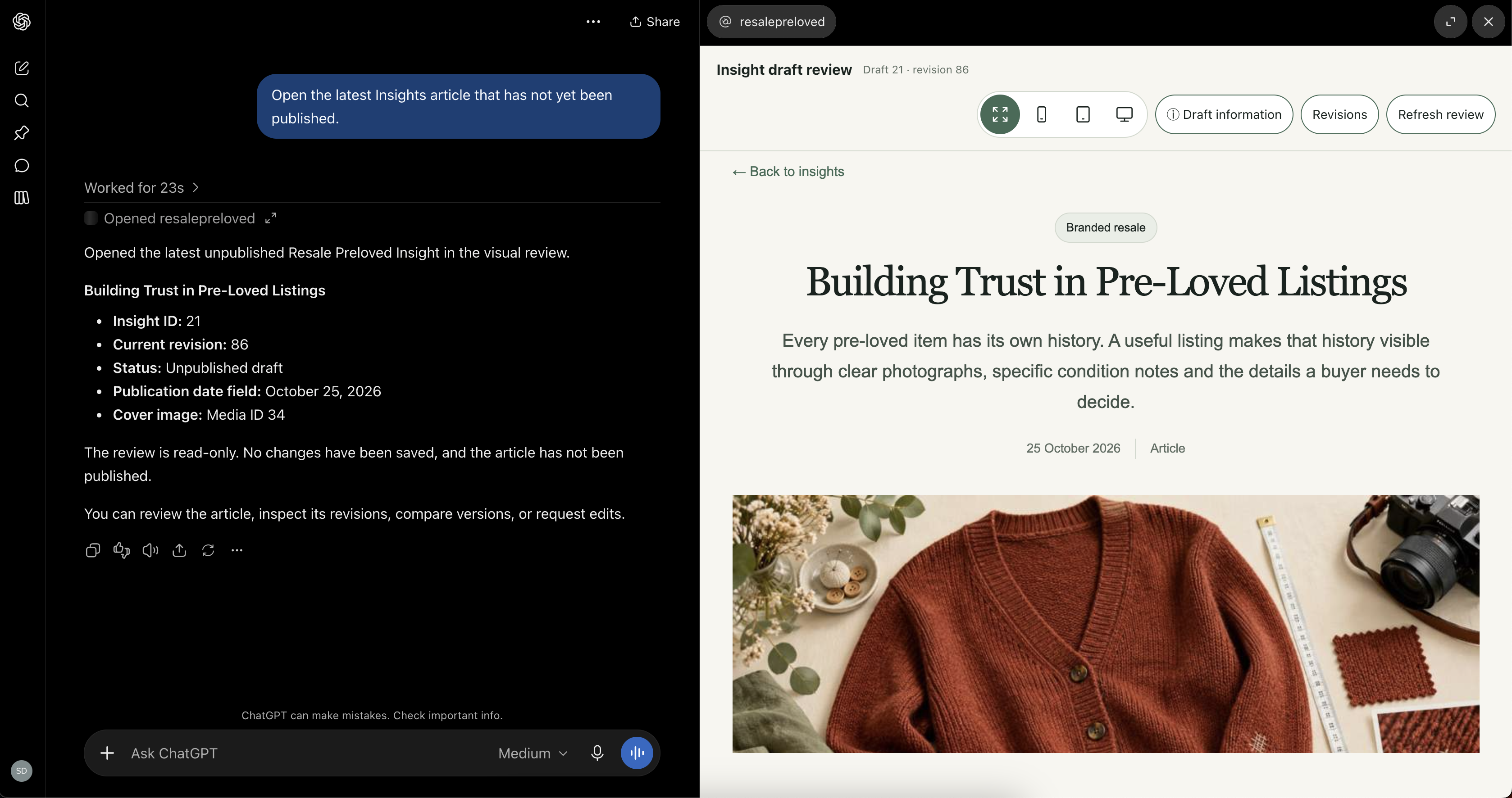
We connected that editorial workflow to ChatGPT through the Model Context Protocol (MCP). We then added an MCP App for visual review, allowing an editor to inspect articles and compare revisions within the conversation.
Drupal manages the content, access checks, revisions and publication state.
MCP connects an AI assistant to defined tools and data sources. MCP Apps add interactive interfaces inside a compatible host, allowing editors to inspect a Drupal article while working in the conversation.
The connection to DrupalCon Rotterdam
In his DrupalCon Rotterdam 2026 keynote, Dries Buytaert demonstrated how an assistant can act on a person’s request while Drupal applies the permissions and publishing rules underneath.
His follow-up article, One description, inside and outside Drupal, develops that direction further: expose Drupal’s data and operations so assistants, frontends and workflow systems can use them.
Our Resale Preloved implementation explores a focused editorial application of that direction. The assistant works with defined operations, and a visual interface helps the editor review the results.
The practical question was: how much of an article’s editorial workflow could we bring into the conversation while keeping Drupal responsible for its content and state?
One editorial system, another interface
ChatGPT
Ask for a change. Inspect the result.
“Prepare a draft and show me the article.”
Drupal
Execute the operation. Keep control of the content.
- Content
- Media
- Revisions
ChatGPT connects to Drupal through the Model Context Protocol (MCP). MCP Server exposes tools and app resources, MCP Server Tool Bridge makes the project’s Tool API operations available to the assistant, and MCP Server OAuth provides authentication and scope checks.
Drupal executes the editorial operations and returns content, status and presentation data for visual review in the MCP App. Content, media and revisions remain managed in Drupal. Publishing requires an explicit request and the applicable Drupal permissions and validation checks.
Start with the editorial workflow
Resale Preloved publishes Insights about branded resale and circular commerce. Each article combines structured content, a cover image, topics and metadata.
We exposed specific operations for finding articles, reading their current state, creating unpublished drafts, updating fields, selecting covers, validating content and publishing on request.
The scope is deliberately focused on Insights. Each operation has a defined purpose and works with the website’s existing Drupal content model. That gives the assistant context for its changes and gives Drupal a clear place to validate them.
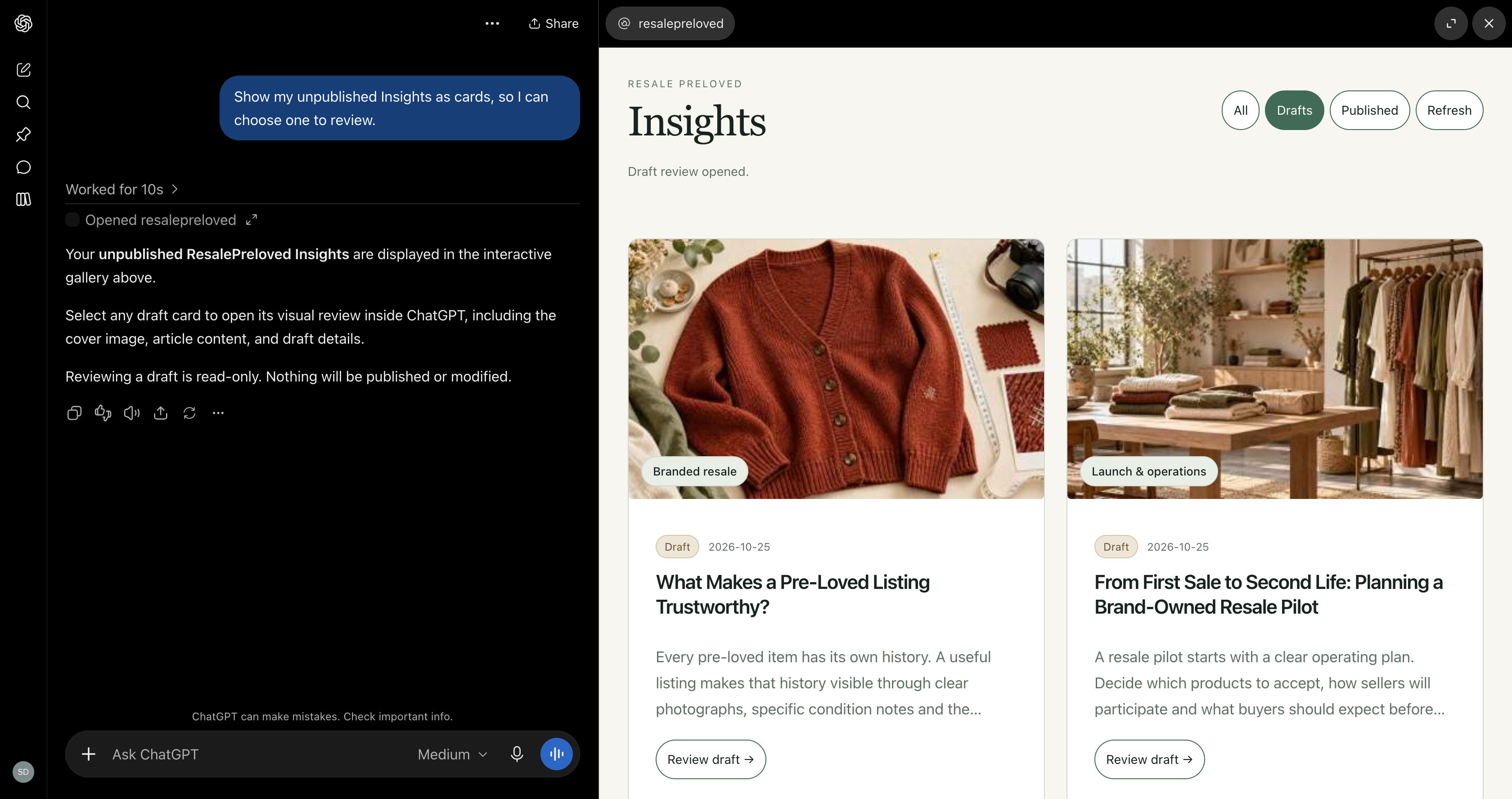
Tools handle the operation. The app supports the review.
A successful tool response can confirm that an article was saved. An editor still needs to inspect it.
We added two visual interfaces through MCP Apps: the article gallery and the draft review. The review displays the cover, headings and body content, with mobile, tablet and desktop preview widths.
Metadata and validation details sit in a collapsed information panel, available without taking attention away from the article. The editorial tools act on Drupal content. The app presents the result so a person can assess it.
Request, save, review
-
01 / Request
Editor + assistant
Create or update an Insight
A defined editorial tool sends the change to Drupal. -
02 / Save
Drupal draft
Validate and save unpublished
Permissions, fields and the expected revision are checked. -
03 / Review
Visual MCP App
Inspect the returned draft
Review the article, then request another edit if needed.
Further edits repeat this cycle. Reviewing a draft does not publish it.

Mobile preview

Tablet preview
Revisions make assistant edits reviewable
Drupal’s revision history is central to this workflow. An editor can list saved revisions and compare versions inside the conversation. Restoring an earlier version creates a new unpublished revision while preserving the historical record.
Updates carry an expectation of the current revision. If another change has been saved in the meantime, the integration rejects the outdated update and asks the assistant to read the article again.
We tested that behaviour by attempting an update against an older revision. Drupal rejected it, and the newer content remained unchanged.
Publication is a separate operation. Reviewing, editing or restoring a draft does not publish it.
Changes remain reviewable
-
01 / Change
Draft revision
An edit creates a saved version
Drupal preserves the article’s revision history. -
02 / Decision
Compare revisions
Review changes or restore an earlier version into a new draft
The editor decides which version to keep. -
03 / Separate action
Publish on request
Requires an explicit publication request and Drupal access checks
Reviewing or restoring a draft does not publish it.
If the current revision has changed, a stale update is rejected before saving.
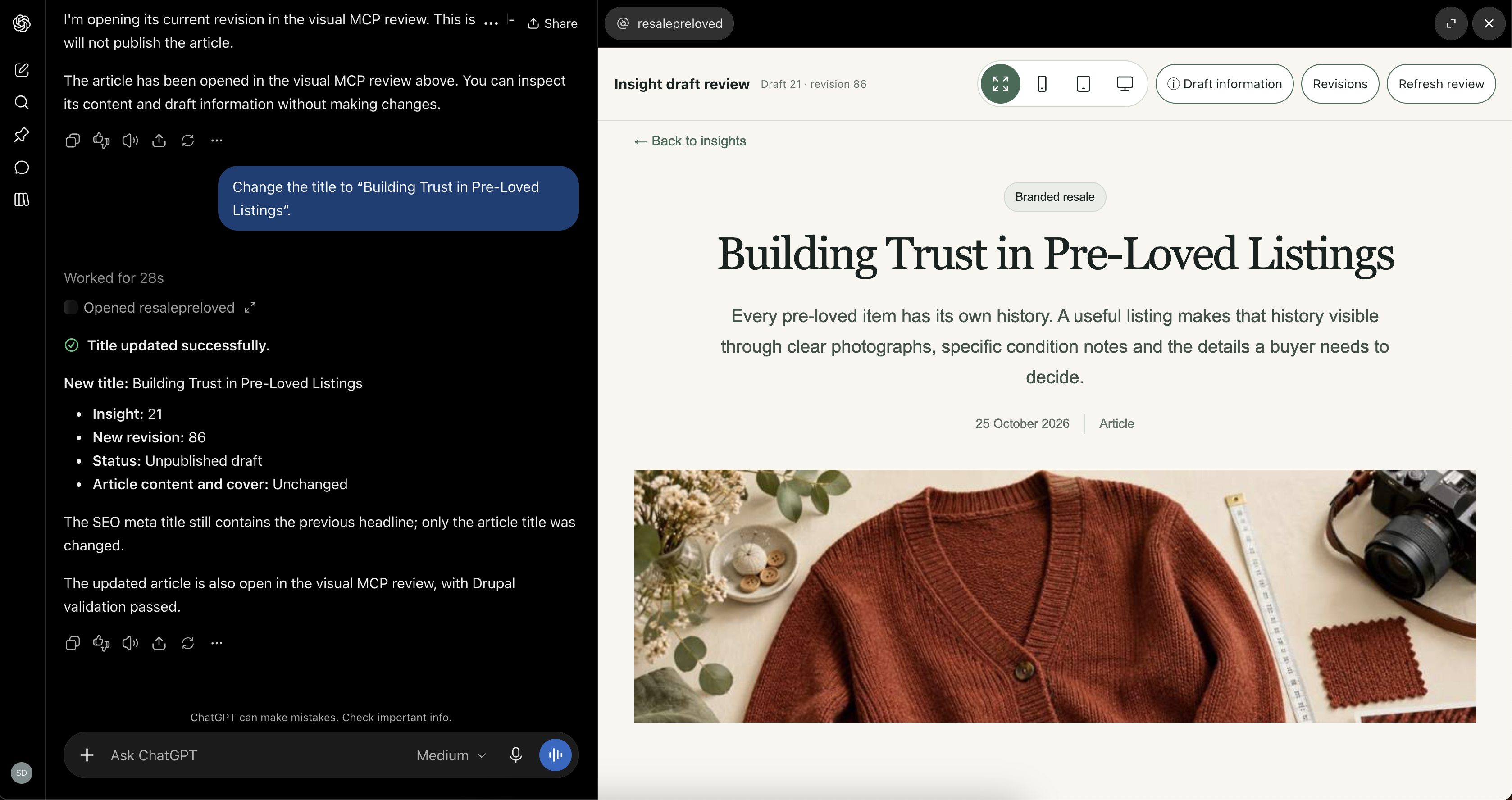
A title change is saved as a new unpublished Drupal revision.
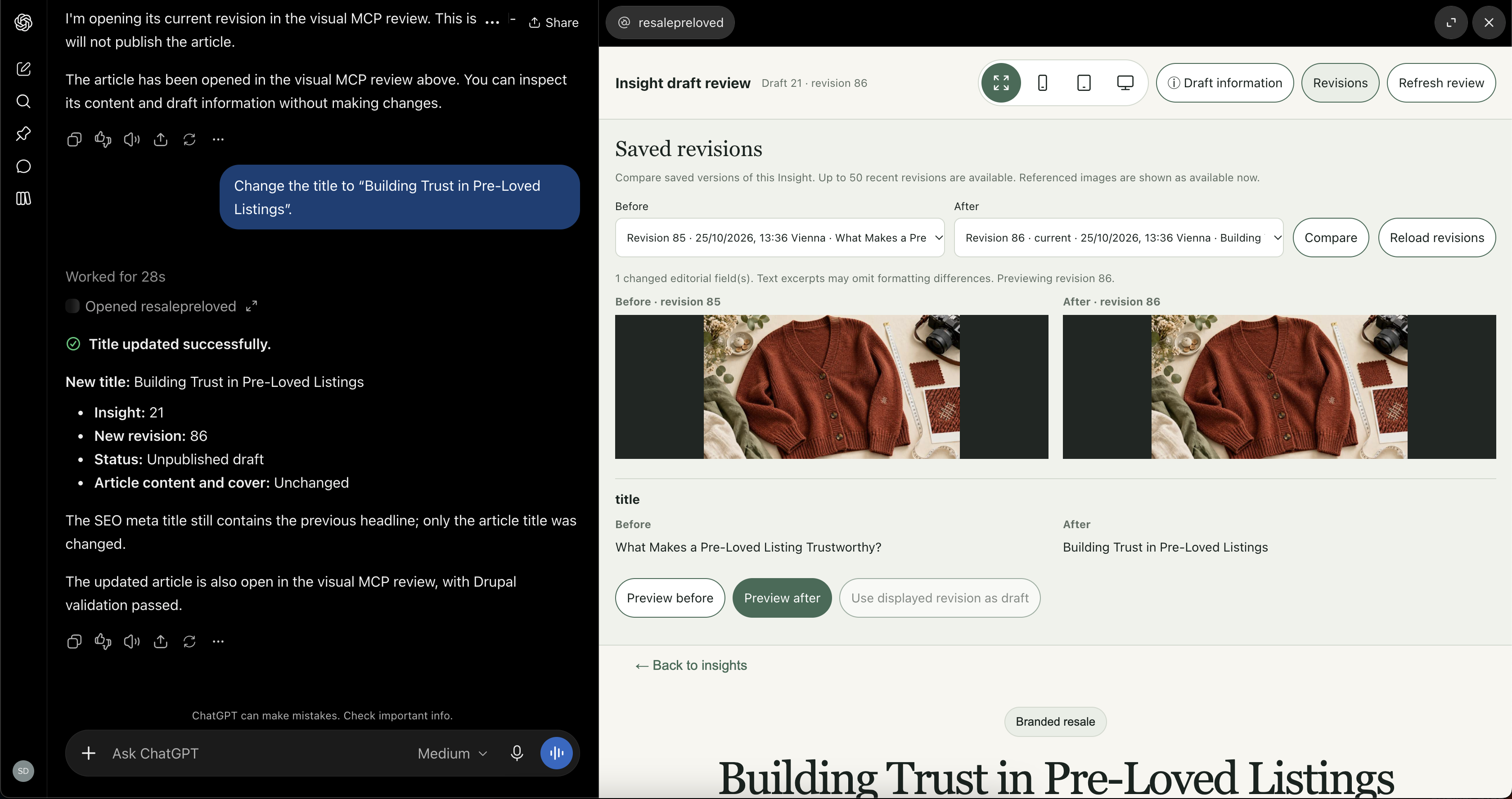
The revision comparison shows the previous title alongside the saved change.
What we built on top of the Drupal foundation
Tool API, MCP Server, MCP Server Tool Bridge and MCP Server OAuth provided the foundation. Our custom modules connect that foundation to the Insights content model and add the visual editorial workflow.
We defined dedicated Tool API plugins with typed inputs, validation constraints and operation-specific permissions. For example, updating a draft requires both its node ID and the expected current revision ID. The plugin passes the request to our editorial operations layer, where the content-specific checks and changes are handled.
For visual review, we added MCP tools and app resources for the article preview, gallery and saved-revision comparison. The review uses Drupal-rendered article markup adapted for the host, with sanitization and isolated styling. It is a defined presentation supplied by the application, rather than an interface generated afresh by the model.
For the module versions used in this implementation, a compatibility patch enabled the MCP Apps extension in the PHP SDK.
We also implemented expected-revision checks, restoration into a new unpublished revision, and request identifiers for repeat-safe draft creation. Preview-only image optimization and whole-response measurement handle the transport constraints without changing the original Drupal media.
These additions connect Drupal’s entity, media, access and revision capabilities to a specific editorial workflow. They are project implementation work; the underlying protocol and contributed modules remain separate dependencies.
Rendering inside the host required a different approach
Our first review implementation placed the article inside a nested iframe. The host’s Content Security Policy blocked that frame.
We changed the implementation to render a sanitized article fragment inside the MCP App, with Shadow DOM isolating its styling. Sanitization restricts the markup that can appear. Shadow DOM keeps the preview’s styles separate from the surrounding interface. Drupal’s access checks determine which content can be returned.
The preview uses a controlled presentation of the article. It excludes scripts, forms, embedded frames and other unsupported elements. It supports editorial review without reproducing every behaviour of the public website.
We also investigated loading the website directly. That experiment did not become the production review approach. The implemented review receives its presentation through the authenticated MCP connection.
Image handling needed a response budget
A revision comparison can include two article presentations and two covers. Encoding those images inside the tool response increases the amount of data transferred. Image dimensions alone did not tell us whether a response would remain manageable.
We added preview image optimization and measured the complete serialized tool result. When necessary, the integration reduces preview image dimensions and quality to fit its configured response budget.
This happens for the preview only. The original managed image and its Drupal media record remain unchanged. If the result still cannot fit, the tool returns an explicit message directing the editor to Drupal. It does not silently truncate the article.
Drupal remains the editorial system
The assistant provides another interface to the publishing workflow. Drupal continues to store the content, enforce permissions, validate changes and maintain revisions.
OAuth scope checks, entity and field access checks, and revision conflict checks remain part of the integration. The visual review is read-only; changes happen through the defined editorial tools.
This separation lets us extend how editors interact with the website while keeping responsibility for content and state in Drupal.
What this could mean for your editorial team
Many teams already use an AI assistant to research topics and prepare content. Connecting that work to the CMS creates an opportunity to include the next steps: saving a structured draft, checking required fields, inspecting the presentation and reviewing changes before publication.
An editor could ask the assistant to prepare an article or product description from an agreed brief, check it against configured editorial guidance and save the result as a structured CMS draft. The team could then inspect the presentation and compare changes before approving publication.
Different checks serve different purposes. Drupal validation can check the configured fields and constraints. An AI-assisted editorial review could flag terminology, completeness or consistency with a brief. Subject experts remain responsible for factual accuracy and editorial approval.
The same idea can apply to an association managing specialist publications, a brand maintaining product information or a company coordinating content across markets. The integration would need to reflect each organization’s content model, permissions and approval process.
A sensible starting point is one recurring task with a clear review step. Define what the assistant may read or change, what the CMS must validate and which decisions belong to a person. That turns an AI conversation into a workflow the team can inspect and control.
What we demonstrated
We tested creating, reading, updating and validating drafts, opening visual reviews, browsing the gallery and comparing saved revisions. We also confirmed revision restoration and publication through the workflow.
The tests included repeated draft creation with the same request identifier and an attempted update against an outdated revision.
The result is a working editorial integration for Resale Preloved’s Insights content. We have not measured editorial time savings or adoption, and the implementation does not cover every Drupal administration task.
It demonstrates a practical way to extend Drupal’s editorial capabilities into another interface: an editor can work through a conversation, inspect the resulting content and decide when it is ready to publish.
What could come next
A possible next step is to extend the workflow from individual articles to component-based pages. An assistant could discover an approved catalogue of Drupal Single Directory Components, select suitable sections and supply content through their defined inputs.
The proposed composition could be saved as an unpublished Canvas page, reviewed visually and refined by an editor. The page would remain editable in Drupal, using the organization’s existing design system.
This is a future development direction. It would require component discovery tools, validated layout and content inputs, Canvas draft handling and preview support for the selected components. The editorial integration demonstrated here provides a starting point for exploring that work around a specific business need.
Related technologies and references
Documentation for the technologies used in this implementation, together with the Drupal direction discussed in Rotterdam.
Bring AI into your editorial workflow.
Have a recurring content task you would like to simplify? We can help you connect an AI assistant to Drupal, with structured drafts, visual review and the approval steps your team needs.
Discuss your workflow